Phishtakedown API Documentation
Our API provides access to our phishing domain database, reported scam Discord servers, and globally banned users. It is designed for security teams, researchers, and developers looking to integrate phishing data into their applications.
All endpoints require an API key via header:
x-api-key: YOUR_API_KEY
Apply here: API Application Form
Domain Endpoints (FishFish)
GET /api/domains
Returns all known phishing domains.
Example Response (200)
[
  {
    "domain": "example-scam.io",
    "reason": "Phishing wallet drainer",
    "first_seen": "2024-01-20"
  }
]
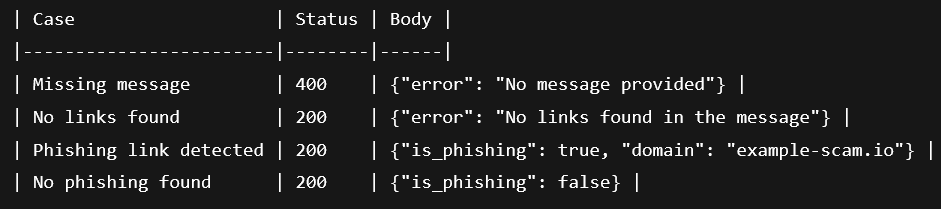
POST /api/check/
Checks a message for phishing links. Extracts URLs from the text and evaluates each.
Request Body
{
  "message": "Check this: http://example-scam.io"
}
Possible Responses
POST /api/report/site
Report a phishing site.
Request Body
{
  "url": "http://scamdomain.io",
  "reason": "Fake crypto support site"
}
Possible Responses

Server Endpoints (Discord Scam Servers)
GET /api/servers
Returns all reported malicious servers.
Example Response (200)
[
  {
    "serverid": "987654321012345678",
    "reason": "Crypto recovery scam",
    "invite": "discord.gg/scamlink",
    "first_seen": "2024-02-01"
  }
]
GET /api/servers/<id>
Check if a Discord server is flagged.
<id> = Discord server ID
Example Request
GET /api/servers/987654321012345678
Example Responses
{"added": true, "id": "987654321012345678"}
{"added": false, "id": "987654321012345678"}
Status: always 200
POST /api/report/server
Submit a Discord server for review.
Request Body
{
  "invite": "discord.gg/suspiciouslink"
}
Possible Responses

User Endpoints (ScammerSlammer)
GET /api/users
Returns all banned users.
Example Response (200)
[
  { "user_id": 123456789012345678 },
  { "user_id": 987654321098765432 }
]
GET /api/users/<id>
Checks if a user ID is banned.
<id> = Discord user ID
Example Request
GET /api/users/123456789012345678
Example Responses
{"banned": true}
{"banned": false}
Status: always 200
Still need help?
Open a support ticket