An overview of the global ban system and how to use it
The global banning system is a core feature of ScammerSlammer and stands as one of its most critical components. This article aims to provide a thorough understanding of when to appropriately use the global banning command and how to effectively execute it within the system.
When to Use the Global Banning System
The global banning command should only be utilized when a scammer has been definitively identified. For example, this includes situations where a user is found sending an invite link to a fraudulent 'support ticket' Discord server or engaging in other clear scam-related activities. It is important to note that the global ban system cannot be applied for violations that are specific to individual server rules, such as spreading fear, uncertainty, and doubt (FUD) or misinformation. In such cases, the appropriate action is to manually ban the user from the specific server rather than using the ScammerSlammer global ban system.
How to Use the Commands
There are three primary commands associated with the global banning system, each serving a distinct purpose:
- /globalban
- /unglobalban
- /checkban
/globalban
The /globalban command is used to add a user to the global ban list, effectively banning them across all servers that utilize ScammerSlammer. To execute this command, you must provide several key pieces of information:
The user you intend to add to the ban list. This identifies the individual to be banned.
A clear and concise reason explaining why the user is being added to the ban list. This helps maintain transparency and accountability.
Photographic evidence supporting the ban. For instance, this could be a screenshot showing the user sending a scam link or engaging in fraudulent behavior.
Once you submit the command with the required information, a confirmation message will appear. This message typically includes details of the ban and prompts you to either confirm or cancel the action.
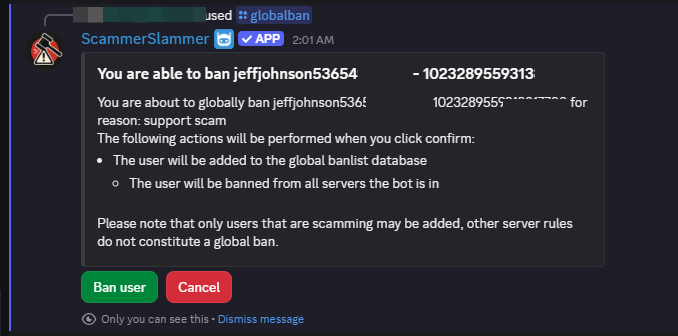
At this stage, you have two options:
Confirm the ban by clicking the 'Ban user' button, which finalizes the global ban.
Cancel the ban by clicking the 'Cancel' button, which aborts the process.
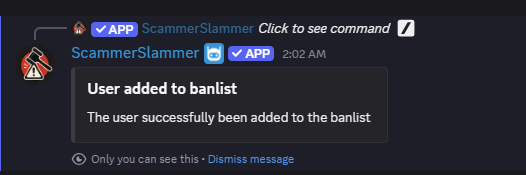
If you confirm the ban, you will receive a follow-up message indicating that the action was successful and that the user has been added to the global ban list.
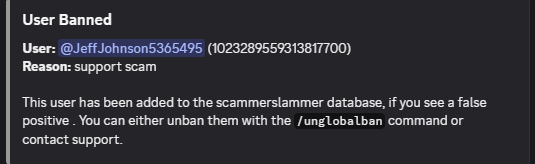
Additionally, the ban action will be logged in your designated logging channel, ensuring that there is a record of the event for moderation and auditing purposes.
/unglobalban
The /unglobalban command is used to remove a user from the global ban list, effectively unbanning them from all servers where they were previously banned using ScammerSlammer. This command is especially useful in cases where the automated moderation system has mistakenly flagged a user—a false positive—and you need to restore their access to the servers.
To execute this command, you must provide the following information:
The user you wish to unban. If the user is no longer present in the server, you will need to provide their user ID to identify them accurately.
A reason explaining why the user is being unbanned. This helps maintain clear records of moderation decisions.
Upon successful completion of the command, you should receive a confirmation message indicating that the user has been removed from the global ban list and unbanned accordingly.
/checkban
The /checkban command is a helpful tool for verifying whether a particular user is currently listed on the ScammerSlammer global block or ban list. This is useful for moderators who want to quickly check a user's status before taking further action.
To perform a check, you need to provide:
The user you want to check. If the user is not a member of the server, you will need to use their user ID to perform the lookup.
After running the command, you will receive a response indicating whether the user is found on the global ban list or not. This allows you to make informed decisions about how to handle the user based on their ban status.
Still need help?
Open a support ticket